How to use formula and rollup attributes in Attio (including conditional totals)
Formula attributes in Attio calculate a value from other attributes on a record, and they can aggregate across associated records using functions like sum() and count(). The one thing they will not do yet is filter an aggregation. You can total the value of every deal linked to a company, but not only the won ones. The workaround is straightforward once you have seen it: put an if() formula on the deal that returns the value when your condition is met and 0 when it is not, then sum that formula from the company. This guide covers the syntax, the workaround, and the point where a workflow is still the better build.
What formula and rollup attributes make possible
This is one of the more useful capabilities to land in Attio, because it changes what a record can tell you at a glance.
A company record stops being a container for deals and becomes a summary of the relationship. Total won value, number of contacts, open pipeline, lifetime revenue, all sitting on the record and all current. An investor record can carry total active holdings. An account can carry its own run rate.
The wider win is that those figures behave like any other attribute, so they can be sorted, filtered and reported on. You can build a list of every client above a revenue threshold, segment by contact count, or sort a pipeline view by lifetime value, without exporting anything to a spreadsheet first.
For a small team, that is the difference between context you have to go and assemble and context that is simply there in the system. Here are the nuts and bolts of it.
What is a formula attribute in Attio?
A formula attribute is a field whose value Attio calculates, rather than something a person types in. You choose Formula as the attribute type, write an expression, and pick an output type: currency, number, text, date and so on.
To explain that as simply as possible, it behaves like a spreadsheet formula that lives on a record and recalculates itself whenever its inputs change. Nobody has to update it, and nobody can forget to.
The everyday uses are the obvious ones. MRR from ARR. Days since a record was created. A margin percentage from two currency fields. A lead score assembled from a handful of attributes.

My mind now that Attio has released formulas and rollups
Can Attio sum or count associated records?
Yes, and this is where formulas start to earn their keep.
Functions like sum() and count() work across associated records reached through a relationship attribute. So count({Associated people > Record ID}) returns the number of people linked to a company, and sum() totals a numeric attribute across every associated record.
That means a company record can carry a live count of contacts, a live count of open deals, and a total value of everything currently in the pipeline. No automation, no sync job, no stale figures.
Why you cannot sum only the records you want
Here is where most people get stuck.
You can sum a numeric attribute across all associated records. You cannot currently apply a condition to that aggregation. There is no SUMIF.
To give you a bit of an idea of why that matters, these are the numbers people usually want on a parent record:
Total value of won deals on a company, ignoring open and lost
Total active holdings for an investor, ignoring exited positions
Committed capital across only the funds that have closed
Annual revenue from only the subscriptions still running
In each case the useful figure is a subset, not the whole. Aggregating a filtered set of related records is a hard problem in any relational data model, not something peculiar to Attio, and it is why the pattern below is worth learning once and then reusing everywhere.
Deal scoring and forecasting
The trick is to stop trying to filter at the point of aggregation, and instead let the child record do the filtering for you.
Two attributes. One on the deal, one on the company.
Step 1: the conditional formula on the deal
Create a formula attribute on the Deals object. Call it Won Deal Amount, with an output type of Currency.
if({Deal stage} == Won, {Deal value}, 0)
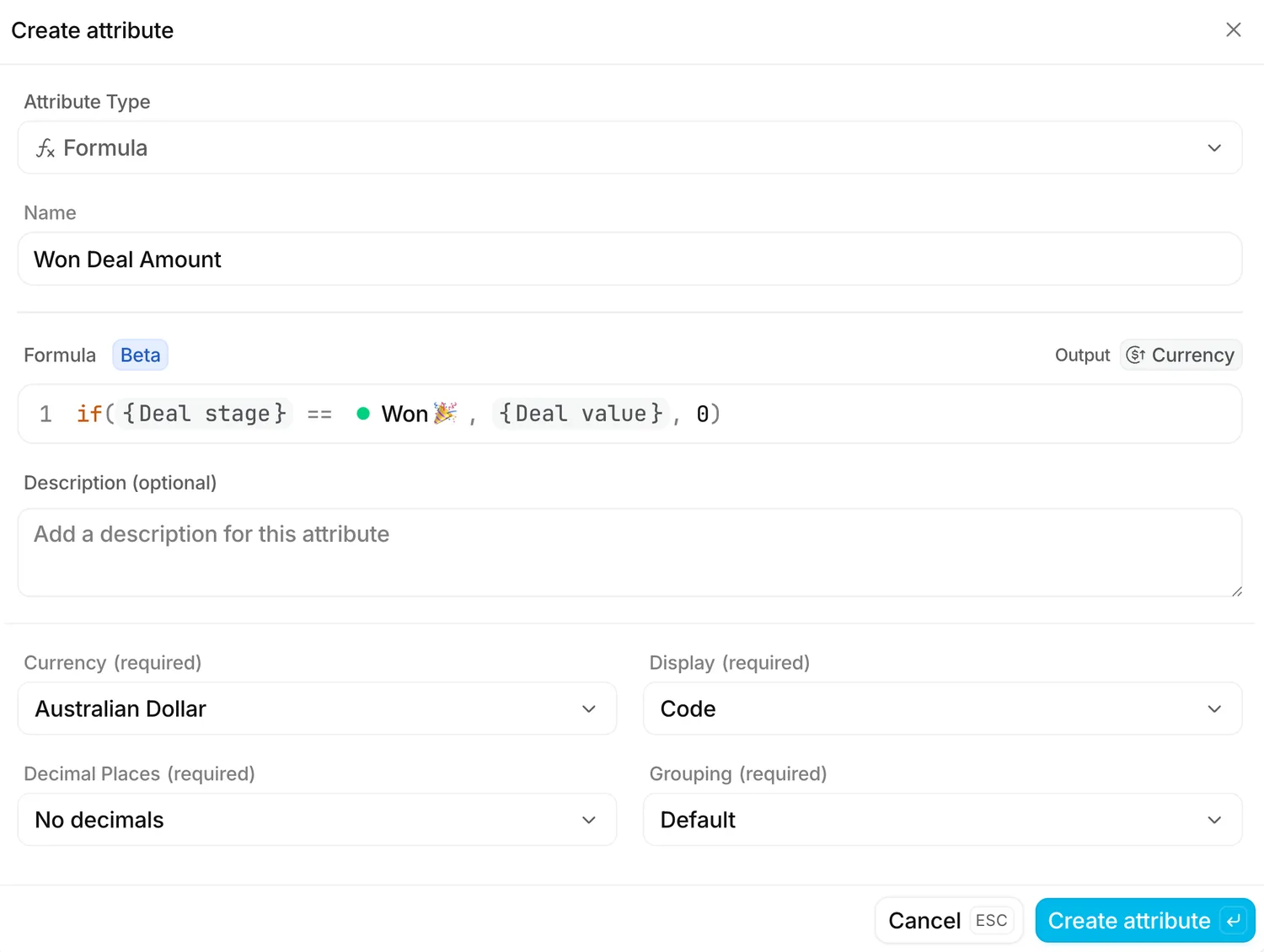
Every deal now carries a second value. If the deal is won, it mirrors the deal value. If it sits at any other stage, it returns 0.
One small thing to watch: the status reference picks up whatever your stage is actually called in your workspace. If your won stage carries an emoji or a different label, select it from the picker rather than typing it, and the formula will resolve correctly.
Step 2: the rollup on the company
Now create a formula attribute on the Companies object. Call it Total Value All Won Deals, again with an output type of Currency.
sum({Associated deals > Won Deal Amount}) ?? 0
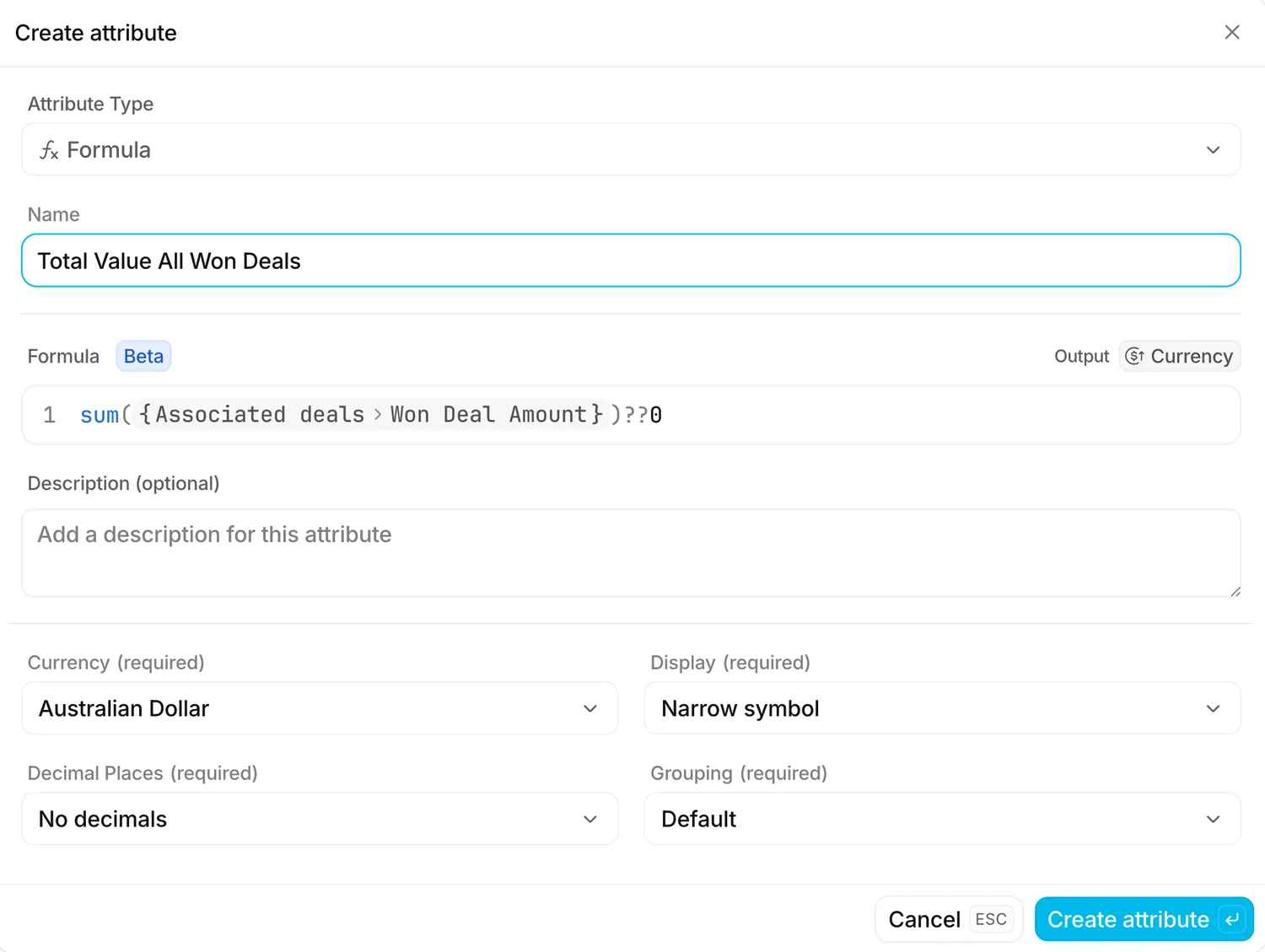
Because every deal that is not won contributes 0, the sum returns the total won value and nothing else. The condition was applied before the aggregation ever happened.
Worth pausing on the ?? at the end. That is a null coalescing operator, and it handles the case where a company has no associated deals at all. Without it, the attribute comes back empty rather than showing $0, which reads like a fault when it is not. I'd encourage you to add it to every rollup you build.
The same pattern, different question
Once the shape is clear, it transfers to almost anything.
For an investment firm, a formula on the holding returns the position value when status is Active and 0 otherwise, then the investor record sums it into total active holdings. For a subscription business, a formula on the contract returns the annual value when the contract is live, and the account sums it into current run rate. For a services firm, a formula on the project returns the fee when the project is delivered, and the client record sums it into lifetime revenue.
Same two steps every time. Condition on the child, aggregation on the parent.
When a workflow is still the better build
Formula attributes will not replace automation entirely, and what I'd normally suggest is keeping a workflow where one of these is true.
The condition depends on data that is not on the child record or reachable through its relationships. Formulas read what is in front of them, so anything requiring external context still needs a workflow.
You need a snapshot rather than a live value. A formula always shows the current answer. If you need won value as it stood on 30 June, you need something that writes a figure and leaves it alone.
The number has to trigger something. Formulas calculate, they do not act. Pair them with a workflow if crossing a threshold should notify someone or move a record.
Formula attributes are also new, so I'd treat filtering and reporting support as something to test against your own use case before you build a dashboard on top of them.
FAQs
Can you do a conditional sum in Attio?
Not directly. There is no SUMIF equivalent in a rollup. Create a formula attribute on the associated record that returns the value when your condition is met and 0 otherwise, then sum that formula from the parent record.
What is the difference between a formula attribute and a rollup in Attio?
Both are formula attributes. A formula calculates from attributes on the same record. A rollup uses a function like sum() or count() to aggregate across associated records reached through a relationship attribute.
Can Attio count associated records?
Yes. count({Associated people > Record ID}) returns the number of linked people. The same pattern works for any relationship attribute.
Do formula attributes update automatically?
Yes. The value recalculates when its inputs change, so there is nothing to run and nothing to keep in sync.
Why does my rollup show as empty instead of zero?
Because the record has no associated records to aggregate. Append ?? 0 to the formula to return zero in that case.
Getting your data model right the first time
Formulas and rollups are one of those capabilities that quietly reward a well-structured workspace. If your objects and relationships are modelled properly, a figure like total won value is two attributes and five minutes of work. If they are not, no formula will save you.